

How to use the Fillable Bracket
Fillable .pdf File
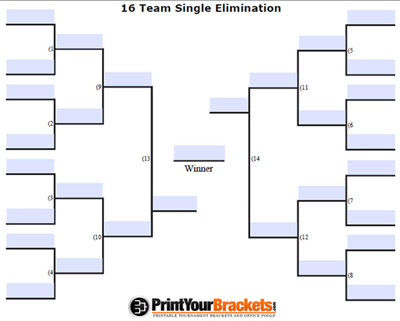
Directly below is a sample image of how your fillable bracket will look. These are .pdf files and require Adobe Reader to view, edit and print. This comes standard on most computers. For full functionality we recommend using the latest version of Adobe Reader.
Features of the Editable Bracket
- With Adobe Reader XI and future versions, you now have the ability to Edit, Save, Email, Update, Download, Upload and Print our fillable brackets.
- You can edit any of the blue fields you see on the bracket. You can also change the text boxes to be the color of your choice(read on for further explanation).
- Leave any or all of the text fields blank. They will appear as blank white space when printed!
- Only the TEXT you type in will appear when printed. The background color of the text boxes will print white! This is a nice feature if you just want to type in the first round match ups and take a clean professional looking bracket to your tournament.
Large Full Screen View
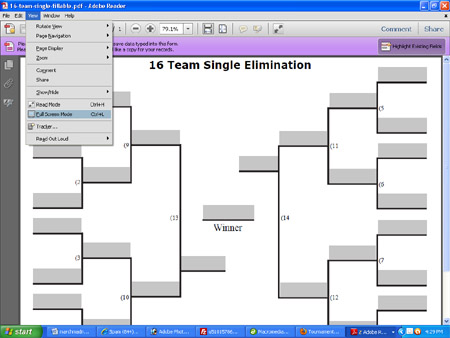
Perhaps the best option with the fillable brackets is you can display it in full screen mode, so that the bracket takes up the entire screen! No Web Browser Showing! No Adobe Reader Showing! Just the Tournament Bracket! This allows you to display live results of your tournament as is progresses.
To do this you will need to save the fillable bracket to your computer.
To get to full screen mode, open the file in Adobe Reader(I am using version X in the image below). Go to > View > Full Screen Mode, once you click that, all you should see is the bracket, the purple bar/gray bar/blue bars should all disappear! To exit the full screen view, simply hit the ESC key on your keyboard.
Changing Colors and Preferences
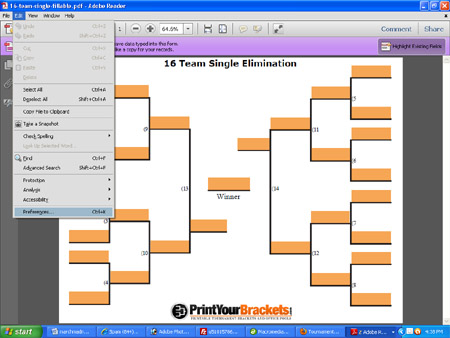
If you will be using this bracket for display mode, you may want to change the color of the text boxes. Remember if you are just filling this out to print, only the text you type in will print, the text box background color will not print.
To edit your color and preferences, Go to > Edit > Preferences, once you click that, a pop up screen will appear. Go to the "Forms" tab and change the "highlight color" to the color of your choice. There are also some other options available under the preferences menu that you could play around with.